
Top Azure Services Every Cloud Engineer Should Know
Azure’s service catalog spans more than two hundred offerings, which makes prioritizing what to learn genuinely difficult. For cloud engineers who want to be productive and hireable, the answer is not to learn every service — it is to build deep knowledge in the top Azure services that appear most frequently in enterprise environments. This guide covers the services you will encounter in almost every Azure-based infrastructure, explains what each one does in practical terms, and shows how they fit together in real-world architectures.
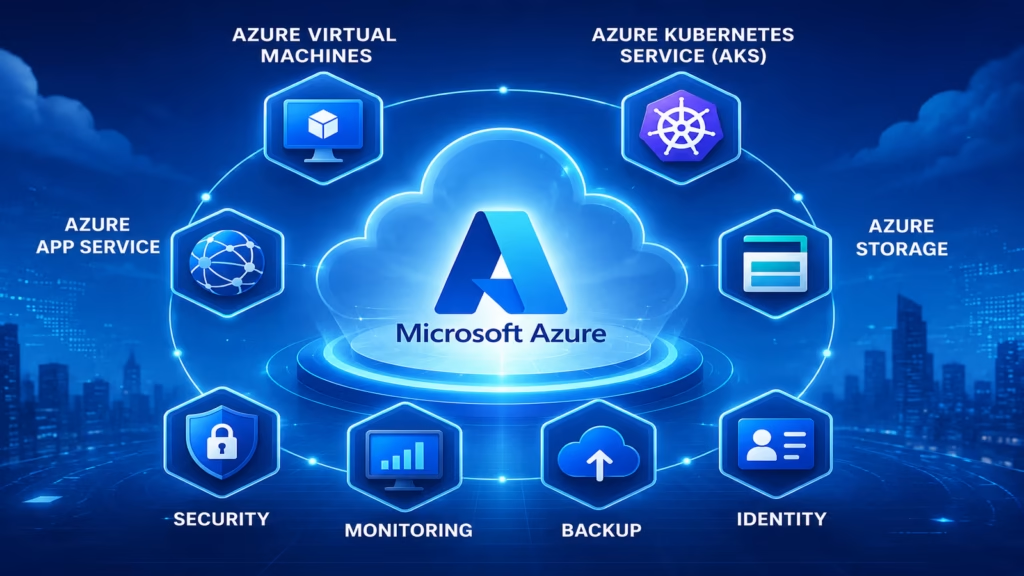
Azure Virtual Machines: The Foundation of IaaS
Azure Virtual Machines (VMs) are the most fundamental top Azure service in the compute category. A virtual machine is a software-emulated computer running in Microsoft’s data centers. You choose the operating system — Windows Server or Linux distributions — and the VM size, which determines how much CPU, memory, and temporary storage the machine has.
Azure organizes VMs into size families. The B-series provides burstable performance suitable for development and testing. The D-series provides balanced compute and memory for general-purpose workloads. The E-series is memory-optimized for database and analytics workloads. The F-series is compute-optimized for batch processing and application servers that need fast CPUs.
In enterprise Azure environments, VMs are rarely deployed alone. They run inside Virtual Machine Scale Sets, which automatically increase or decrease the number of VM instances based on CPU utilization or schedule. An application server that runs on two VMs during normal traffic and scales up to twenty VMs during peak load is a standard Azure architecture pattern. Cloud engineers are responsible for configuring, managing, and optimizing these scaling behaviors.
Azure Kubernetes Service: Container Orchestration at Scale
Azure Kubernetes Service (AKS) is one of the most strategically important top Azure services in modern cloud engineering. It provides a managed Kubernetes cluster where Microsoft handles the control plane — the Kubernetes master nodes — while you manage the worker node pools where your application containers run.
AKS integrates deeply with other Azure services. You authenticate your cluster with Azure Active Directory so that your organization’s existing user identities control cluster access. Container images live in Azure Container Registry and are pulled by AKS automatically during deployments. Application traffic enters through an Azure Application Gateway Ingress Controller that handles SSL termination and path-based routing. Cluster logs and metrics flow into Azure Monitor and Log Analytics for observability.
Most companies adopting microservices architecture in Azure end up on AKS. Understanding how to write Kubernetes manifests, configure Helm charts for application deployment, set up horizontal pod autoscalers, and troubleshoot failing pods is essential for any cloud engineer working in an enterprise Azure environment in 2026.
Azure App Service: Deploying Web Apps Without Managing Servers
Azure App Service is a Platform as a Service (PaaS) offering that runs web applications and REST APIs without requiring you to manage any underlying virtual machines or operating systems. You deploy your application code — or a Docker container — and Azure handles the hosting infrastructure automatically.
App Service supports applications built in .NET, Java, Python, Node.js, Ruby, and PHP. For organizations with existing Microsoft development teams, the .NET integration is particularly seamless. Azure DevOps pipelines can push code directly to App Service slots, making zero-downtime deployments straightforward.
Deployment slots are one of the most useful App Service features. A deployment slot is a second instance of your app service where you can deploy new code and test it in a production-like environment before swapping it into production with zero downtime. If the new version causes problems after the swap, you swap back immediately, restoring the previous version in seconds. This pattern is used extensively in organizations that need to release frequently without accepting production risk.
Azure Storage: Blobs, Files, Queues, and Tables
Azure Storage is one of the top Azure services that appears in virtually every cloud architecture. A single Azure Storage Account provides access to four different storage types serving different purposes.
Blob Storage stores unstructured data — files of any format at any scale. Images, videos, backups, log archives, and application assets all go into Blob Storage. It supports three access tiers: Hot for frequently accessed data, Cool for infrequently accessed data at a lower cost, and Archive for long-term retention at the lowest cost.
Azure Files provides fully managed file shares accessible over the SMB protocol. Virtual machines can mount Azure Files shares just as they would mount a local network drive, making it easy to migrate on-premises file server workloads to the cloud without changing application code.
Queue Storage provides message queuing between application components. One service deposits messages into a queue. Another service reads and processes them independently. This decouples the two services so that a spike in incoming requests does not overwhelm the processing service — requests simply queue up and are processed at a steady rate.
Table Storage is a NoSQL key-value store for structured data that does not require complex relational queries. It is cost-effective for storing large volumes of structured data that needs simple, fast lookups.
Azure SQL Database and Cosmos DB
Database management is one of the most common responsibilities for cloud engineers, and two Azure database services dominate enterprise workloads: Azure SQL Database and Azure Cosmos DB.
Azure SQL Database is a fully managed relational database service based on Microsoft SQL Server. It handles backups automatically every five to twelve minutes, provides point-in-time restore going back up to thirty-five days, and offers built-in high availability through geo-replication. Organizations migrating existing SQL Server databases from on-premises data centers to Azure use SQL Database as the target because compatibility is very high and the migration process is well-supported by Microsoft tools.
Azure Cosmos DB is a globally distributed NoSQL database that provides single-digit millisecond read and write latencies. It supports multiple data models — document, graph, key-value, and column-family — through compatible APIs including MongoDB, Cassandra, and Gremlin. The most impressive feature is its global distribution capability. You can configure Cosmos DB to replicate data automatically across any combination of Azure regions and it handles all synchronization, conflict resolution, and failover transparently. Applications that need to serve users across multiple continents with low latency make Cosmos DB a strong candidate.
Azure Active Directory and Entra ID
Azure Active Directory — now rebranded as Microsoft Entra ID — is the identity and access management backbone of every Azure environment. It handles authentication for users accessing Azure resources, Microsoft 365 applications, and thousands of third-party SaaS applications through Single Sign-On.
For cloud engineers, the key Entra ID concepts to master are Managed Identities, Conditional Access, and Role-Based Access Control (RBAC). Managed Identities allow Azure resources — virtual machines, App Service instances, Lambda-equivalent Azure Functions — to authenticate to other Azure services without storing credentials anywhere in code or configuration files. This eliminates a major class of security vulnerabilities caused by leaked API keys and passwords.
Conditional Access policies define the conditions under which users can access resources. For example, a policy can require Multi-Factor Authentication whenever a user tries to access the Azure portal from outside the corporate network. These policies apply organization-wide and are a critical security control in enterprise Azure environments.
Azure DevOps: The Complete CI/CD Platform
Azure DevOps is a comprehensive platform that covers the entire software delivery pipeline. It includes Boards for project management and sprint tracking, Repos for Git version control, Pipelines for CI/CD automation, Test Plans for manual and automated testing management, and Artifacts for package management.
Azure Pipelines is the component cloud engineers interact with most frequently. You define build and release pipelines in YAML files that automate the process of taking code from a repository commit to a deployed application. Pipelines can build Docker images, run test suites, push images to Azure Container Registry, and deploy to AKS, App Service, or virtual machines using deployment gates and approval workflows.
In Microsoft-stack enterprises, Azure DevOps is the default CI/CD platform. Cloud engineers who are proficient in Azure Pipelines and can integrate them with AKS and App Service deployments are consistently in demand at organizations that have standardized on the Microsoft Azure ecosystem.
Azure Monitor and Application Insights
Azure Monitor is the central observability platform that collects metrics and logs from Azure resources, on-premises servers, and custom applications. Log Analytics Workspaces receive log data from across your environment, and Kusto Query Language (KQL) lets you write powerful queries to investigate issues, build dashboards, and set up alert rules.
Azure Monitor includes Application Insights as its application performance monitoring solution. By adding the Application Insights SDK to your application code, you get detailed telemetry — request rates, response times, failure rates, dependency call performance, and custom business events. Application Insights automatically detects anomalies in application behavior and surfaces them in a smart detection dashboard without requiring you to manually configure every alert.
For cloud engineers, knowing how to configure diagnostic settings to route logs to Log Analytics, write useful KQL queries for incident investigation, and create meaningful metric alert rules separates those who keep systems healthy from those who only react to outages after they happen.
Azure Networking: VNet, Load Balancer, and Front Door
Networking is where many cloud engineers spend a significant portion of their time, and understanding the top Azure networking services is essential for designing secure, high-performing systems.
Azure Virtual Network (VNet) is the networking foundation. Every Azure resource you deploy into a VNet gains an isolated private network space. You divide VNets into subnets, apply Network Security Groups to control traffic flow, and peer VNets together to allow resources in different VNets to communicate privately without traffic leaving Microsoft’s network.
Azure Load Balancer operates at Layer 4 (TCP/UDP) and distributes incoming traffic across virtual machines in a backend pool. It performs health checks and automatically stops sending traffic to unhealthy instances. The Application Gateway operates at Layer 7 (HTTP/HTTPS) and adds URL-based routing, SSL termination, and Web Application Firewall capabilities.
Azure Front Door is a global application delivery network that routes user requests to the nearest healthy backend across Azure regions. It provides global load balancing, instant failover when a regional backend fails, DDoS protection, and integrated CDN capabilities. For globally deployed applications with users across multiple continents, Front Door is the recommended entry point.
Top Azure Services at a Glance
| Azure Service | Category | Primary Use |
|---|---|---|
| Azure Virtual Machines | Compute | Scalable server infrastructure |
| Azure Kubernetes Service | Containers | Microservices orchestration |
| Azure App Service | PaaS | Web apps and APIs |
| Azure Blob Storage | Storage | Object and file storage at scale |
| Azure SQL Database | Database | Managed relational database |
| Azure Cosmos DB | Database | Global NoSQL database |
| Microsoft Entra ID | Identity | Identity and access management |
| Azure DevOps | DevOps | CI/CD and project management |
| Azure Monitor | Observability | Metrics, logs, and alerting |
| Azure Front Door | Networking | Global load balancing and CDN |
Azure Certifications for Cloud Engineers
Formal Azure certifications validate your knowledge of the top Azure services and significantly improve your employability. For cloud engineers who have moved past the fundamentals, the most valuable certifications in 2026 are:
- AZ-104 Azure Administrator — validates ability to manage Azure subscriptions, virtual networks, VMs, storage, and identity. This is the certification most commonly required for cloud administrator and infrastructure engineer roles at Microsoft-stack companies.
- AZ-204 Azure Developer — tests knowledge of building cloud-native applications using Azure services including App Service, Functions, Cosmos DB, and Azure API Management. Most relevant for developers building applications on Azure.
- AZ-400 Azure DevOps Engineer Expert — the most advanced DevOps certification on the Azure platform. Covers CI/CD pipelines, infrastructure as code, monitoring, and security in the Azure DevOps ecosystem. This expert-level certification is highly regarded by employers building and running Azure-based software delivery systems.
Earning the AZ-104 first gives cloud engineers the broadest foundation. AZ-204 or AZ-400 can follow depending on whether your career focuses more on development or DevOps engineering.
Start Your Cloud Engineering Career Today
Join WhaleCourse Technologies for affordable training with hands-on projects and placement support.
Conclusion
The top Azure services covered in this guide — Virtual Machines, AKS, App Service, Storage, SQL Database, Cosmos DB, Entra ID, Azure DevOps, Azure Monitor, and Azure networking — form the core competency set that every cloud engineer working in an Azure environment needs to master. These services appear in nearly every enterprise Azure architecture, and understanding how they connect together is what makes an engineer genuinely productive rather than technically literate but practically limited.
The most effective way to build this knowledge is through hands-on practice. Create a free Azure account, work through the free tier services, and build projects that combine multiple services together. A web application backed by a SQL database, deployed through an Azure DevOps pipeline, monitored by Azure Monitor, and secured with Entra ID Managed Identities teaches you more in one project than reading documentation alone ever will.
Cloud engineering built on deep Azure expertise is one of the most stable and well-compensated career paths in technology today. The demand for engineers who genuinely understand these top Azure services — not just at a conceptual level but in production — continues to grow as organizations of every size commit to the Microsoft Azure platform for their cloud infrastructure.
In This Article
Enroll in Our IT Courses
Master IT Program at whalecoursetechnologies
- Expert Mentorship from IT Professionals
- Job-Ready Skills with Live Projects
- Career Boost Add-on Modules
- 100% Placement & Interview Support
