
AWS Architecture Explained for Beginners
AWS architecture can seem overwhelming at first. Amazon Web Services offers over two hundred services, and knowing where to begin is the real challenge. This guide explains AWS architecture in plain language for complete beginners. You will understand how AWS is structured, what its foundational services do, how applications are built on top of them, and why certain architectural decisions are made in real-world deployments. No prior cloud experience is required.
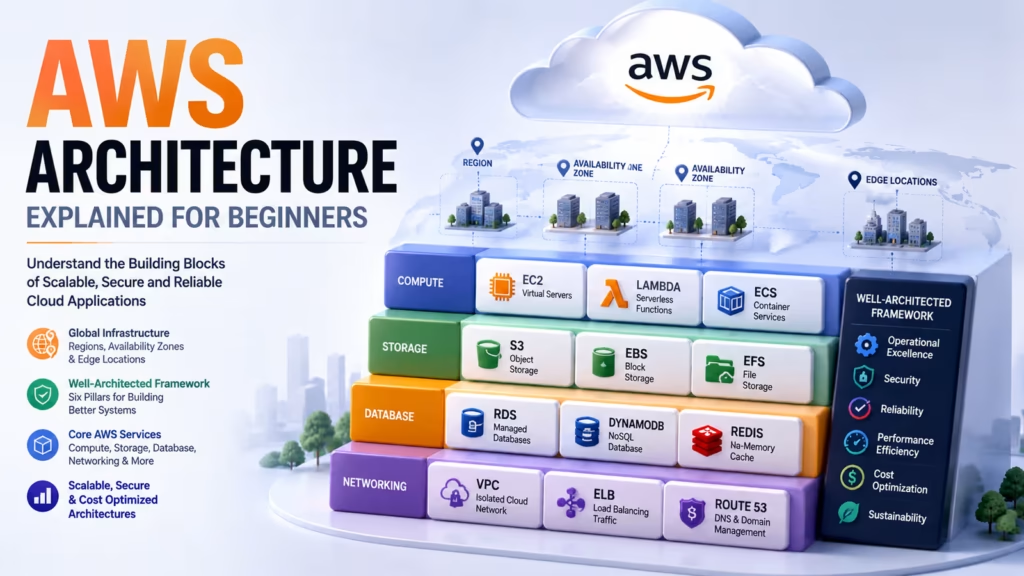
How AWS Is Organized: Regions and Availability Zones
Understanding AWS architecture starts with understanding how Amazon organizes its global infrastructure. AWS operates through a system of Regions, Availability Zones, and Edge Locations.
A Region is a geographic area where AWS operates data centers. Each Region is completely independent. Examples include Mumbai (ap-south-1), Singapore (ap-southeast-1), and US East Virginia (us-east-1). When you create a resource like a server or database, you select which Region it lives in. Placing resources in the Region closest to your users reduces latency and improves application response time.
Within each Region, there are multiple Availability Zones, typically three to six. An Availability Zone is one or more discrete data centers within a Region, each with its own independent power, networking, and cooling. They are physically separated from each other but connected by high-speed private fiber networks. If one data center experiences a power failure or flooding, the others continue operating. Building applications across multiple Availability Zones is the foundation of high availability on AWS.
Edge Locations are smaller infrastructure points distributed globally that bring content closer to end users. AWS CloudFront, the content delivery network, uses Edge Locations to cache and serve static content — images, videos, scripts — from the location nearest to each visitor.
The AWS Well-Architected Framework
Amazon developed the AWS Well-Architected Framework as a set of best practices for designing cloud systems. It organizes architectural principles into six pillars that every application on AWS should consider.
- Operational Excellence — running and monitoring systems to deliver business value and continuously improving processes.
- Security — protecting information and systems through strong access controls, data encryption, and monitoring for threats.
- Reliability — ensuring a system performs its intended function correctly and consistently, recovering from failures automatically.
- Performance Efficiency — using computing resources efficiently and maintaining that efficiency as demand changes.
- Cost Optimization — avoiding unnecessary costs and understanding spending patterns to maximize value.
- Sustainability — minimizing environmental impact through efficient resource usage and avoiding over-provisioning.
You do not need to master all six pillars as a beginner, but understanding that these considerations exist helps you ask the right questions as you learn more about AWS architecture.
Compute Services: EC2, Lambda, and ECS
Compute is the ability to run code and process data. AWS offers several compute models, each suited to different architectural patterns.
Amazon EC2 (Elastic Compute Cloud) provides virtual servers in the cloud. You choose an instance type that specifies the CPU, memory, and storage, select an operating system, and launch a server within minutes. EC2 is the most flexible compute option because you have full control over the operating system and can install anything you want. It is best suited for applications that need persistent servers running continuously.
AWS Lambda is a serverless compute service. You write a function — a single piece of code — and upload it to Lambda. Lambda executes that function only when triggered by an event such as an API request, a file upload to S3, or a database change. You are charged only for the milliseconds your function runs. Lambda eliminates server management entirely and scales automatically from zero to millions of executions without any configuration.
Amazon ECS (Elastic Container Service) runs Docker containers without requiring you to manage the underlying cluster infrastructure. Paired with AWS Fargate, ECS becomes fully serverless — you define your container, and AWS handles all the server provisioning underneath. This is the most common way companies run containerized microservices in AWS architecture today.
Storage Services: S3, EBS, and EFS
Storage is one of the most fundamental components of AWS architecture. Different storage services serve different purposes.
Amazon S3 (Simple Storage Service) is object storage designed for storing any type of file — images, videos, documents, backups, and application logs. S3 is infinitely scalable, highly durable with eleven nines of durability (99.999999999%), and accessible from anywhere over HTTP. It is the default choice for storing static assets and unstructured data in AWS architecture.
Amazon EBS (Elastic Block Store) provides persistent block storage for EC2 instances. Think of it as a virtual hard drive that attaches to your virtual server. When you stop and restart an EC2 instance, EBS data persists. EBS is best for databases, operating system files, and applications that need low-latency disk access.
Amazon EFS (Elastic File System) is a shared file system that multiple EC2 instances can access simultaneously. When multiple servers need to read and write the same files — for example, a shared media library — EFS provides the solution. It scales automatically and charges only for storage actually used.
Networking: VPC, Subnets, and Security Groups
Networking defines how your AWS resources communicate with each other and with the internet. This is where most beginners find AWS architecture most confusing, but the fundamentals are straightforward once explained clearly.
A VPC (Virtual Private Cloud) is your own isolated section of the AWS cloud. Every resource you create lives inside a VPC. You define its IP address range and control all networking rules within it. Your VPC is completely isolated from other customers’ VPCs by default.
Within a VPC, you create Subnets — smaller segments of your VPC’s IP address range. A public subnet has a route to the internet through an Internet Gateway, making resources in it publicly accessible. A private subnet has no direct internet access, making it suitable for databases and backend servers that should not be exposed to the internet.
Security Groups act as virtual firewalls for individual resources. You define which types of network traffic are allowed in (inbound rules) and out (outbound rules) of each resource. A well-designed AWS architecture uses Security Groups to enforce the principle of least privilege at the network level — each resource only accepts traffic from the specific sources that need to communicate with it.
Database Services: RDS, DynamoDB, and ElastiCache
Data storage in AWS architecture goes beyond file storage. Applications need databases that store structured and semi-structured data and provide fast query capabilities.
Amazon RDS (Relational Database Service) is a managed service that runs relational databases — MySQL, PostgreSQL, Oracle, SQL Server, and Amazon Aurora. AWS handles backups, patching, failover, and replication automatically. This reduces the database administration burden dramatically compared to running a database on a self-managed EC2 instance.
Amazon DynamoDB is a fully managed NoSQL database designed for applications that need consistent single-digit millisecond performance at any scale. It is used by some of the world’s largest applications — Amazon’s own retail platform uses DynamoDB extensively. It is best for workloads with simple access patterns that do not require complex SQL joins.
Amazon ElastiCache provides in-memory caching using Redis or Memcached. By storing frequently accessed data in memory rather than fetching it from a database on every request, applications can reduce database load by eighty to ninety percent for certain read-heavy workloads. Caching is a standard component of high-performance AWS architecture.
A Typical Three-Tier AWS Architecture
A three-tier architecture is a widely used approach for building web applications on AWS. It separates the application into three layers: presentation, application, and data. Here is how it maps to AWS services.
| Tier | Purpose | AWS Services |
|---|---|---|
| Presentation Tier | Serves the user interface | CloudFront, S3, ALB |
| Application Tier | Processes business logic | EC2, ECS, Lambda |
| Data Tier | Stores and retrieves data | RDS, DynamoDB, ElastiCache |
Each tier runs in its own layer of the VPC. The presentation tier lives in a public subnet. The application and data tiers live in private subnets. An Application Load Balancer distributes incoming traffic across multiple EC2 instances in the application tier across two or more Availability Zones, providing fault tolerance and scalability simultaneously.
Security in AWS Architecture: IAM and Best Practices
AWS Identity and Access Management (IAM) controls who can access AWS services and resources, and what they are allowed to do. Every action in AWS — starting a server, uploading a file, reading a database — requires explicit permission granted through IAM policies.
Key IAM best practices for secure AWS architecture:
- Avoid using the root account for everyday tasks. Create individual IAM users with only the permissions they need.
- Enable Multi-Factor Authentication on the root account and all IAM users with console access.
- Use IAM Roles for applications and services rather than hardcoding access keys in code. EC2 instances and Lambda functions assume roles rather than using static credentials.
- Apply the principle of least privilege — grant the minimum permissions required for each task, not broad administrative access.
- Regularly audit IAM permissions and remove unused access using IAM Access Analyzer.
Monitoring and Observability with CloudWatch
Amazon CloudWatch is the native monitoring and observability service in AWS. It collects metrics, logs, and events from virtually every AWS service and your own applications. Without CloudWatch, you are operating your AWS architecture blind — you have no visibility into whether your systems are healthy, performing well, or approaching resource limits.
CloudWatch Metrics collect numerical data over time — CPU utilization, network traffic, database query count, Lambda invocation errors. You can create alarms that trigger notifications or automated actions when a metric crosses a threshold. For example, an alarm that sends an SMS when your EC2 CPU stays above eighty percent for five minutes gives you early warning before performance degrades for users.
CloudWatch Logs aggregates log data from your applications, EC2 instances, Lambda functions, and other services into a searchable log store. CloudWatch Log Insights allows you to run SQL-like queries across log data to investigate incidents quickly without downloading and searching log files manually.
Getting Started: AWS Free Tier and Certifications
AWS offers a free tier that gives new accounts twelve months of free access to core services within defined usage limits. The free tier includes 750 hours per month of EC2 t2.micro instances, five gigabytes of S3 storage, 750 hours of RDS database usage, and one million Lambda requests per month. This is more than enough to build real projects and practice AWS architecture concepts without incurring costs.
The recommended certification path for beginners learning AWS architecture:
- AWS Certified Cloud Practitioner — the entry-level certification. Covers cloud concepts, AWS services overview, billing, and security at a high level. Ideal as your first AWS credential.
- AWS Certified Solutions Architect Associate — the most popular AWS certification globally. Tests your ability to design applications using AWS services correctly. This is the certification most requested by employers.
- AWS Certified Developer Associate — focuses on building and deploying applications using AWS services and SDKs. Pairs well with the Solutions Architect certification for application developers.
Start Your Cloud Computing Career Today
Join WhaleCourseTechnologies for affordable training with hands-on projects and placement support.
Conclusion
AWS architecture is built on a set of foundational concepts that, once understood, make the rest of the platform much more approachable. Regions and Availability Zones define where your resources live and how they stay resilient. IAM controls who can access them. VPC and Security Groups control how they communicate. EC2, Lambda, S3, and RDS are the core building blocks that most applications are assembled from.
The three-tier architecture pattern gives you a concrete mental model for how these services connect together in a real application. Start by building simple projects using the free tier — a static website on S3, a web application on EC2, a serverless API using Lambda and API Gateway. Each project teaches you something that reading alone cannot.
AWS architecture knowledge opens doors to some of the most sought-after roles in technology. Cloud engineers, solutions architects, and DevOps engineers who understand AWS deeply are in consistent high demand across every industry. The investment in learning AWS pays back many times over throughout a technical career.
In This Article
Enroll in Our IT Courses
Master IT Program at whalecoursetechnologies
- Expert Mentorship from IT Professionals
- Job-Ready Skills with Live Projects
- Career Boost Add-on Modules
- 100% Placement & Interview Support
