
Top 10 AWS Services Every Cloud Engineer Must Learn
Cloud computing has changed the way businesses and individuals build software. Instead of buying physical computer servers, setting them up in a server room, and worrying about power outages, you can now rent computers and storage over the internet. Amazon Web Services, commonly known as AWS, is the largest cloud provider in the world. For anyone starting a career in technology, understanding the top 10 AWS services is the best way to get started. These core tools handle everything from hosting simple websites to managing massive amounts of database information. If your goal is to build a career as a cloud engineer, learning the most important AWS services first will make your learning journey more focused and efficient. Let us look at the most essential tools that you should learn to build a strong foundation in cloud computing.
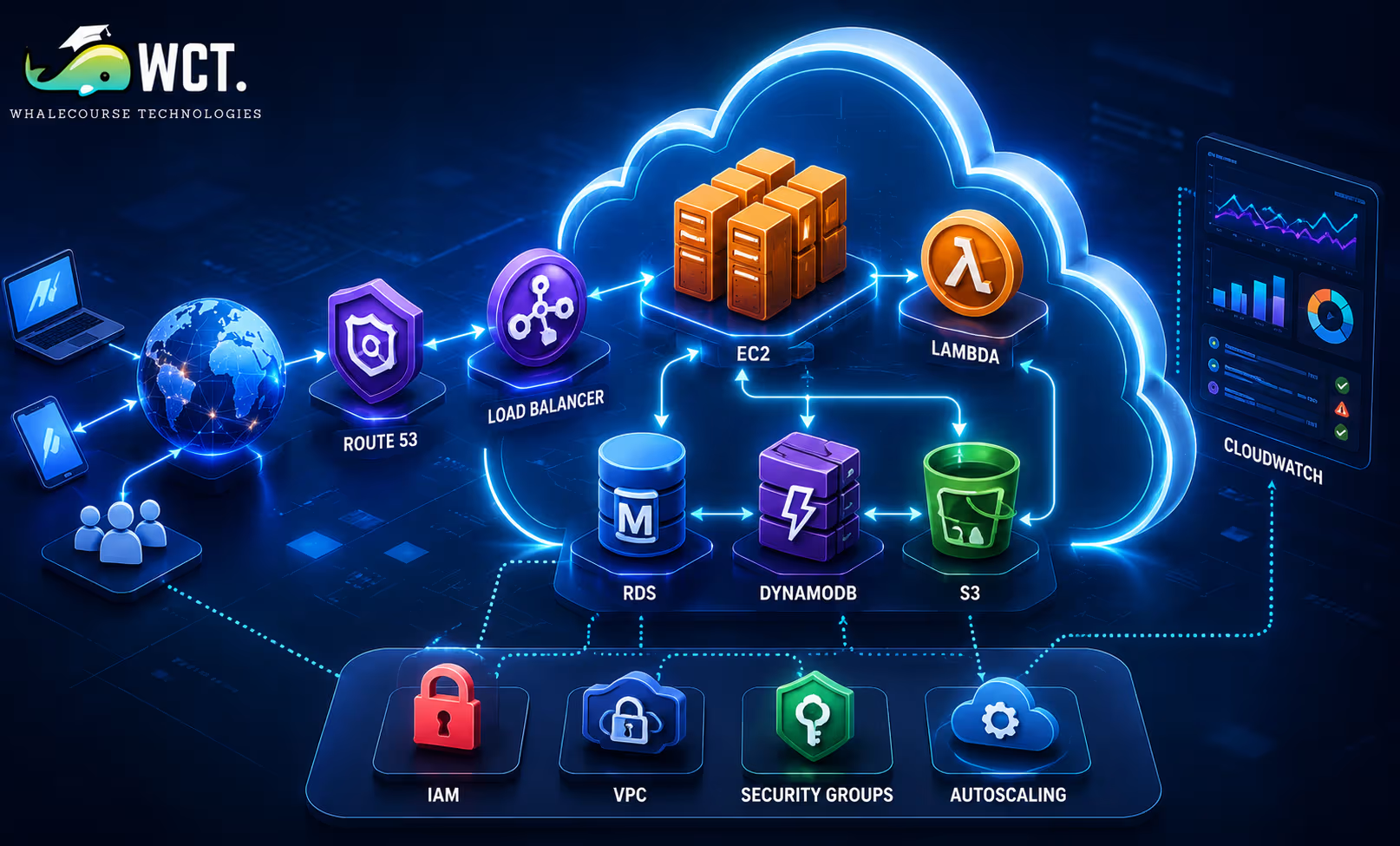
Why Understanding the Top 10 AWS Services Matters for Your Career
AWS offers hundreds of different services, which can feel incredibly overwhelming when you first log into the management console. You might see names like Kinesis, SageMaker, or Athena and have no idea what they do or how to use them. However, you do not need to learn all of them to get a job or build useful software. Most companies rely heavily on a small group of core systems to run their daily operations. By mastering the top 10 AWS services, you gain the ability to design and maintain about ninety percent of the applications deployed in the cloud today. This targeted focus saves you months of studying irrelevant tools.
When hiring managers look for junior cloud engineers, they do not expect you to be an expert in every obscure tool. Instead, they want to see that you understand how servers talk to each other, where files are stored safely, and how to keep data secure. These fundamental skills are all taught through the primary AWS services. Learning these tools first gives you a structured path. Once you understand the basics, learning the advanced services becomes much easier because they are usually built on top of these ten foundational pillars. You will be able to speak confidently during job interviews and tackle real-world problems.
Core Compute and Storage Services
Let us begin by exploring the most popular compute and storage options. Every application needs computer brains to run its code and a safe place to keep its files. These four services are the absolute foundation of any cloud infrastructure.
1. Amazon EC2: Virtual Servers in the Cloud
Amazon Elastic Compute Cloud, or EC2, is one of the oldest and most popular parts of AWS. Simply put, EC2 allows you to create and use virtual servers hosted within Amazon’s cloud infrastructure. You can choose how much memory, processing power, and storage space you want, and then install whatever operating system you prefer, such as Linux or Windows. This flexibility allows you to configure and manage your server environment according to your application requirements.
For a cloud engineer, EC2 is the starting point for understanding how cloud servers operate. You can provision a virtual server within a few minutes, access it securely from a remote location, and deploy web applications with ease. It gives you complete control over the system, but this also means you are responsible for updating the operating system, fixing bugs, and keeping the server secure. Understanding EC2 teaches you about networking, security groups, and operating systems.
2. Amazon S3: Scalable Object Storage
Amazon Simple Storage Service, or S3, is a tool designed to store files, images, videos, and backups. Unlike your computer’s hard drive which organizes files in folders and subfolders, S3 uses a concept called object storage. Each file is treated as an object and gets a unique web link so you can access it easily from anywhere with the right permissions.
S3 is incredibly reliable and cheap. Amazon duplicates your files across multiple physical buildings, making it almost impossible to lose your data. Cloud engineers use S3 to host static web pages, store user-uploaded images for mobile apps, and keep long-term backups of company files. Understanding S3 is important because many AWS services rely on it to store and manage application data behind the scenes.
3. Amazon RDS: Managed Relational Databases
Most applications need a structured database to store user accounts, transactions, and product details. Amazon Relational Database Service, or RDS, makes it easy to set up and run databases like MySQL, PostgreSQL, and SQL Server in the cloud. It removes the pain of setting up database engines manually.
Normally, setting up a database on a physical server requires manual installation, regular backups, and complex security configurations. RDS handles all of these annoying tasks for you. It automatically backs up your data, installs security updates, and lets you increase your database size with the click of a button. This allows you to focus on writing code and designing your database structure rather than managing servers.
4. AWS Lambda: Running Code Without Servers
AWS Lambda is the leader of the serverless movement. With traditional systems, you pay for a server to run twenty-four hours a day, even if no one is using your application. With Lambda, you only upload your code, and AWS runs it automatically whenever a user makes a request. This saves a lot of money and reduces administration work.
Charges apply only for the time your code is actively running, measured in milliseconds. When your application receives no requests, there are no compute costs to pay. If a million people visit at once, Lambda automatically scales up to handle the traffic. This makes it perfect for small tasks, like resizing an image when a user uploads it or sending an email notification. It is an essential tool for modern cloud architecture.
Database and Networking Essentials (Services 5 to 7)
- Amazon VPC (Virtual Private Cloud): A VPC is your own private network inside AWS. It acts like a digital fence that keeps your servers safe from the public internet. You can choose which servers are allowed to talk to the outside world and which ones must remain hidden. Understanding how to set up subnets, route tables, and firewalls inside a VPC is one of the most important skills a cloud engineer can have. A properly secured network helps protect sensitive business data from unauthorized access, which is why careful network design is an essential responsibility for every cloud engineer.
- AWS IAM (Identity and Access Management): Protecting cloud resources begins with strong access management. IAM allows you to define who can sign in to your AWS environment and what actions each user is permitted to perform. You can create user accounts for your team members and assign specific permissions to them. For example, you can allow a developer to upload files to an S3 bucket but prevent them from deleting database servers. Learning how to follow the principle of least privilege, which means only giving people the minimum access they need to do their job, is vital for protecting company assets.
- Amazon DynamoDB (NoSQL Database): While RDS is great for traditional relational databases, DynamoDB is designed for speed and scale. It is a fully managed NoSQL database that can handle millions of requests per second with single-digit millisecond response times. DynamoDB does not require you to define a strict structure for your data beforehand. This flexibility makes it ideal for mobile apps, gaming leaderboards, and shopping carts where speed and high availability are more important than complex database queries.
Routing Monitoring and Scaling Tools (Services 8 to 10)
- Amazon Route 53: It is a managed DNS service designed to deliver reliable performance while handling traffic at any scale. It translates human-friendly web addresses like www.example.com into numeric IP addresses that computers use to talk to each other. Route 53 also monitors the health of your servers and can automatically redirect traffic to healthy servers if one crashes, ensuring your application remains online.
- Amazon CloudWatch: You cannot fix a problem if you do not know it exists. CloudWatch helps you monitor AWS resources by gathering logs, performance metrics, and operational events in one place. You can set up alarms that send you a text message or email if your server’s CPU usage gets too high or if your website experiences an unusual number of errors, allowing you to react quickly to issues.
- Elastic Load Balancing (ELB): If your website suddenly gets popular, a single server might crash under the pressure. ELB intelligently spreads incoming user requests across multiple servers to maintain consistent application performance. This ensures that no single server gets overwhelmed and that your website remains online for all users. It works hand-in-hand with Auto Scaling to add more servers when traffic spikes.
How to Start Practice Projects with These Services
Reading about the cloud is a good start, but you will only truly learn by building things yourself. A practical first step is to create an AWS Free Tier account, giving you access to many of these services at no cost for the first twelve months. As you begin building projects, focusing on these top 10 AWS Services will help you avoid feeling overwhelmed and keep your learning process well organized.
Start by creating a simple static website and hosting it on Amazon S3. Once that works, try building a web application where a user can submit a form. You can use AWS Lambda to process the form data, save it to a DynamoDB table, and send an email confirmation. By connecting these tools together, you will learn how they interact in the real world. This practical experience is exactly what companies look for on a resume and will make your portfolio stand out.
Crucial Security and Cost Tips for Beginners
One common fear among new cloud engineers is accidentally receiving a massive bill from AWS. Since you pay for what you use, a simple mistake like leaving a powerful database running can cost hundreds of dollars. To prevent this, the first thing you should do after creating your account is set up a billing alarm in Amazon CloudWatch. This alarm will send you an email if your projected monthly spend goes over a small amount, like five dollars. This simple step gives you peace of mind while experimenting.
Additionally, always secure your root account. Enable multi-factor authentication, also known as MFA, immediately. This requires you to enter a code from your phone whenever you log in, preventing hackers from taking over your account and using your servers to mine cryptocurrency or deploy unauthorized resources. Security should always be your first priority.
Frequently Asked Questions About AWS Learning Paths
Here are some of the most common questions that beginners ask when starting their AWS learning path:
- What is the best AWS certification to begin with? The AWS Certified Cloud Practitioner is the best starting certification. It covers general cloud concepts and explains the basic services. After that, you should target the AWS Certified Solutions Architect Associate, which teaches you how to design secure and cost-effective systems using the core services.
- Is programming knowledge required before learning AWS? You do not need to be a software developer to start, but knowing some basic programming is very helpful. Writing simple scripts in languages like Python will help you automate tasks and write serverless functions in AWS Lambda.
- Can I learn AWS for free? Yes, AWS offers a Free Tier that includes free hours of EC2, storage in S3, and database capacity in RDS. Always make sure to clean up and delete your resources when you are done practicing to avoid any unexpected charges.
Start Your Data Analytics Career Today
Join WhaleCourseTechnologies for affordable training with hands-on projects and placement support.
Conclusion
Building a career in cloud engineering does not require you to learn everything at once. By narrowing your focus to the top 10 AWS services, you can master the essential concepts of compute, storage, databases, networking, and security. Together, these services provide the core foundation used to develop and operate most modern cloud applications across different industries.
Start by setting up a free account, building small projects, and monitoring your billing. Over time, you will gain the confidence to design complex, reliable systems that can support millions of users across the globe. The cloud is a vast and exciting field, and mastering these ten core services is the perfect first step toward a successful career.
In This Article
- Why Understanding the Top 10 AWS Services Matters for Your Career
- Core Compute and Storage Services
- Database and Networking Essentials (Services 5 to 7)
- Routing Monitoring and Scaling Tools (Services 8 to 10)
- How to Start Practice Projects with These Services
- Crucial Security and Cost Tips for Beginners
- Frequently Asked Questions About AWS Learning Paths
- Conclusion
Enroll in Our IT Courses
Master IT Program at whalecoursetechnologies
- Expert Mentorship from IT Professionals
- Job-Ready Skills with Live Projects
- Career Boost Add-on Modules
- 100% Placement & Interview Support
