
Cloud-Based Testing Environments Are Becoming Increasingly Common in QA Automation
The shift toward cloud testing in QA automation is not a trend that appeared suddenly. It has been building steadily as software teams face a combination of pressures: more browsers to support, more devices, faster release cycles, and smaller budgets for physical lab infrastructure. Cloud-based test environments address these pressures directly. This article explains what cloud testing means for QA teams, how it differs from traditional on-premise setups, which platforms lead the market, and what teams should consider before making the transition.
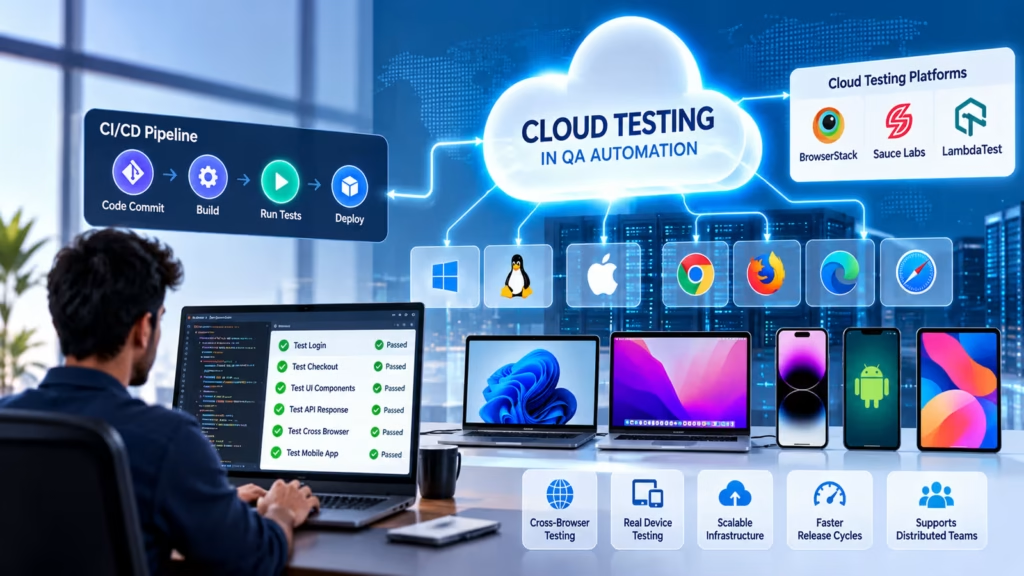
What Cloud Testing in QA Automation Actually Means
Cloud testing refers to using remote, provider-managed infrastructure — browsers, operating systems, real devices, and virtual machines — to execute automated tests rather than running them on local machines or physical test labs.
In a traditional setup, a QA team maintains a fixed pool of machines. Each machine runs a specific OS and browser version. When a new browser version is released or a new device needs to be supported, the lab must be updated manually. Scaling up for a release means provisioning additional hardware. This model is expensive, slow to adapt, and difficult to maintain as teams grow.
Cloud testing replaces this with on-demand infrastructure. A cloud testing platform provides access to hundreds of browser/OS combinations, real mobile devices, and virtual machines through an API or dashboard. Tests connect to these environments remotely, execute, and return results — with no hardware to manage on the QA team’s side.
Key Drivers Behind Adoption
Several interconnected factors have pushed cloud testing from a niche option to mainstream practice in QA automation.
Cross-browser and cross-device coverage is the most immediate driver. Users access applications through dozens of browser versions and hundreds of device configurations. Reproducing that diversity locally is not feasible for most teams. Cloud platforms maintain large, continuously updated libraries of environments that would cost far more to replicate in a physical lab.
Release velocity is another major factor. As teams move to weekly, daily, or even multiple daily releases, the time available for testing contracts. Cloud infrastructure allows parallel test execution at a scale that compresses test cycle times significantly. A suite that takes 90 minutes to run sequentially can be completed in under 15 minutes when distributed across cloud nodes.
Remote and distributed teams also benefit substantially. When developers, QA engineers, and stakeholders are in different cities or countries, shared cloud testing infrastructure provides a consistent environment that everyone can access without VPN complexity or machine-specific configuration.
Types of Cloud Testing Environments
Not all cloud testing environments work the same way. The three primary types serve different testing needs:
Browser cloud platforms — Services like BrowserStack, Sauce Labs, and LambdaTest provide remote access to real browsers running on real operating systems or virtual machines. Tests connect to these environments through WebDriver protocols. Selenium, Playwright, and Cypress can all run against these platforms with configuration changes. These are the most commonly used cloud testing services for web application QA.
Real device clouds — For mobile application testing, platforms provide access to physical iOS and Android devices. Testing on real hardware catches issues that simulators miss — rendering differences, touch gesture behavior, camera permissions, and network conditions. BrowserStack App Automate and Sauce Labs Virtual Cloud both offer real device access.
Containerized test environments — Some teams use cloud-hosted container platforms (such as AWS ECS, Google Kubernetes Engine, or GitHub Actions hosted runners) to spin up clean Docker containers for each test run. This gives fine-grained control over the test environment without relying on a third-party browser cloud. It requires more infrastructure configuration but is well-suited for teams with existing DevOps expertise.
Integrating Cloud Testing With CI/CD Pipelines
Cloud testing environments reach their full value when integrated with CI/CD pipelines. The combination — automatic test triggering plus cloud infrastructure — means every code change is validated against the full range of supported environments without any manual setup per run.
The integration typically works through credentials and endpoint configuration. A Selenium test suite connects to a cloud grid endpoint (for example, a BrowserStack or Sauce Labs hub URL) using an access key, rather than connecting to a local WebDriver. The CI pipeline injects these credentials as environment variables and passes the target browser and OS configuration to the test runner.
Most cloud platforms provide ready-made integration samples for Jenkins, GitHub Actions, GitLab CI, Azure DevOps, and CircleCI. The configuration differences between local and cloud execution are usually limited to the WebDriver URL and capabilities object — the tests themselves do not need to change.
Challenges Teams Face With Cloud Testing
Cloud testing in QA automation is not without its complications. Teams adopting it for the first time encounter a predictable set of challenges.
Cost management is the most common concern. Cloud platforms typically charge per concurrent session, per minute of test execution, or per device slot. A suite with many long-running tests or high parallel concurrency can generate significant monthly costs. Understanding the pricing model and estimating usage before committing to a platform is essential.
Network-dependent test stability is another issue. Tests that run against remote cloud environments depend on network latency between the CI agent and the cloud grid. Connection instability or high latency introduces flakiness that does not exist when tests run locally. Configuring appropriate wait timeouts and retry logic reduces but does not eliminate this problem.
Data privacy and compliance requires attention for applications handling sensitive user data. Some organizations cannot route test data through third-party cloud providers due to regulatory requirements. In these cases, self-hosted Selenium Grid on private cloud infrastructure (AWS, Azure, GCP) may be a more appropriate solution than a commercial browser cloud.
Choosing the Right Cloud Testing Platform
The right platform depends on what your team is testing and how. BrowserStack is the most widely used commercial browser cloud and has strong Selenium, Playwright, and Cypress support. It also offers a real device cloud for mobile testing. Sauce Labs has a long track record in enterprise environments and provides detailed analytics on test execution history. LambdaTest is a cost-competitive alternative with a growing feature set, popular with teams that need large parallel concurrency at lower cost.
For teams that want to avoid third-party data routing, building a private Selenium Grid on AWS or Azure using Kubernetes-managed containers gives control over both cost and data residency. The initial setup is more involved, but the ongoing operational cost is predictable.
Before committing, run a proof of concept with your actual test suite. Trial periods from commercial platforms allow you to evaluate real-world performance, flakiness rates, and integration complexity before purchasing.
Cloud Testing and AI-Assisted QA
Cloud testing platforms are increasingly incorporating AI-assisted capabilities alongside their infrastructure offerings. These include intelligent test failure analysis — where the platform identifies whether a failure is caused by a real defect or by test environment noise — and visual testing comparison tools that detect UI regressions across screenshots from different browser/OS combinations.
Some platforms now offer AI-assisted test maintenance features that detect broken locators after a UI change and suggest updated selectors. While these capabilities are still maturing, they represent a meaningful evolution beyond raw infrastructure provision. Teams evaluating cloud platforms for long-term adoption should consider the roadmap of AI-assisted features alongside current infrastructure capabilities.
The combination of scalable cloud infrastructure and AI-assisted test analysis is moving cloud testing in QA automation toward a model where teams spend less time managing infrastructure and debugging flaky test environments, and more time writing meaningful test cases.
When On-Premise Testing Still Makes Sense
Cloud testing is the right choice for most web and mobile QA teams. But there are scenarios where on-premise or hybrid approaches remain appropriate. Applications with strict data residency requirements — banking, healthcare, government systems — may be unable to send any application data to external cloud providers. Performance and load testing against internal systems on private networks often cannot route through a commercial cloud grid. Specialized hardware testing — embedded systems, IoT devices, proprietary hardware interfaces — requires physical access that cloud providers cannot offer.
For these scenarios, building a private Selenium Grid on internal servers, or using cloud infrastructure within a private VPC without external data exposure, provides a middle path. Many enterprise QA teams use a hybrid model: cloud testing for standard browser and device coverage, on-premise environments for sensitive or specialized scenarios. Understanding which parts of your test coverage genuinely require private infrastructure helps avoid both over-investment in internal labs and unnecessary compliance risk from routing data externally.
Start Your Data Analytics Career Today
Join WhaleCourseTechnologies for affordable training with hands-on projects and placement support.
Conclusion
Cloud testing in QA automation has moved from an emerging option to the default approach for most web and mobile testing teams. The combination of on-demand browser and device coverage, elastic scaling for parallel execution, and straightforward CI/CD integration removes the infrastructure burden that made comprehensive cross-browser testing impractical for smaller teams. The challenges — cost management, network stability, and data compliance — are real but manageable with the right platform choice and configuration practices.
For teams still running tests exclusively on local machines or a small fixed lab, the transition to cloud infrastructure offers genuine improvements in coverage, speed, and scalability. Starting with a trial run of your existing test suite against a commercial platform is the most direct way to evaluate whether the benefits justify the cost for your specific context.
In This Article
Enroll in Our IT Courses
Master IT Program at whalecoursetechnologies
- Expert Mentorship from IT Professionals
- Job-Ready Skills with Live Projects
- Career Boost Add-on Modules
- 100% Placement & Interview Support
