DevOps Tutorial for Beginners: Complete Guide
DevOps has moved from a buzzword into a foundational discipline that shapes how software is built, tested, and delivered. For beginners, the challenge is that DevOps is not a single tool or technology — it is a combination of cultural practices, workflows, and a toolchain that works together. This DevOps tutorial for beginners explains the core concepts clearly, covers the essential tools, and gives you a practical picture of what a DevOps engineer actually does, so you can decide whether this career path fits your goals and where to start learning.
What Is DevOps?
DevOps is a set of practices that combines software development (Dev) and IT operations (Ops) with the goal of shortening the software development lifecycle while delivering high-quality software continuously. The term reflects both a cultural philosophy and a technical approach.
Before DevOps, development and operations teams worked separately. Developers wrote code, threw it over the wall to operations, and operations deployed it — often weeks or months later. Bugs found in production were difficult to trace because the deployment process was manual, inconsistent, and poorly documented. Release cycles were long, and coordination between teams was painful.
DevOps removes these silos. Developers and operations engineers work together from design through deployment. Processes that were previously manual — building, testing, deploying — are automated. This allows teams to release software far more frequently, detect problems faster, and recover from failures more quickly.
The DevOps Lifecycle
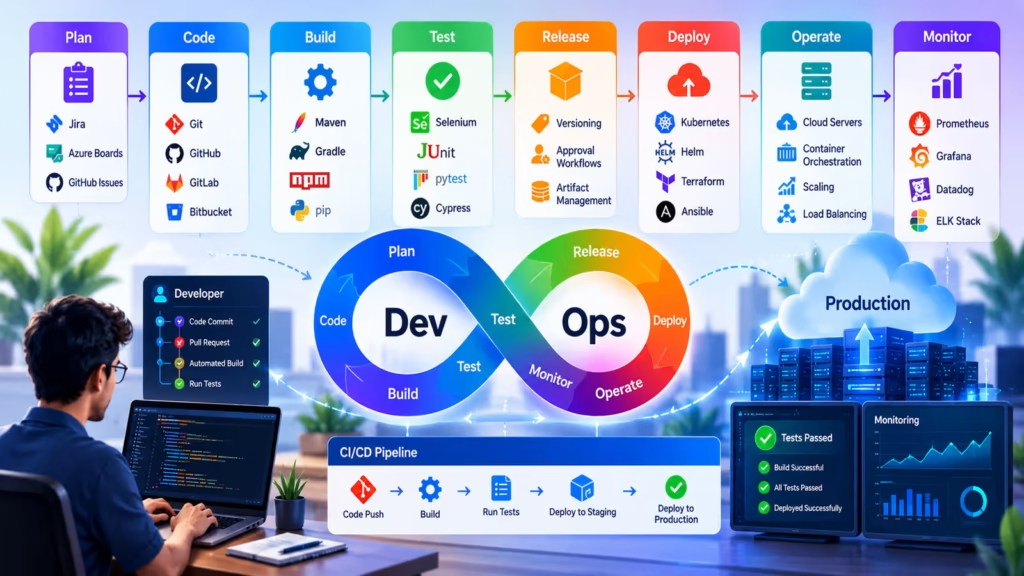
The DevOps lifecycle describes the continuous cycle of activities involved in delivering software. Understanding each phase gives beginners a clear picture of where different tools and practices fit:
- Plan — Teams define requirements, track work items, and coordinate sprints. Tools like Jira, Azure Boards, and GitHub Issues are used here.
- Code — Developers create and manage application source code using version control systems. Git is widely adopted. GitHub, GitLab, and Bitbucket are commonly used platforms for hosting repositories.
- Build — Source code is compiled, packaged, and prepared for testing. Maven, Gradle, npm, and pip are common build tools depending on the language.
- Test — Automated tests — unit, integration, and end-to-end — validate code quality before it progresses. Testing is integrated into the CI pipeline rather than run manually.
- Release — Approved builds are organized for deployment. This stage covers version control, authorization processes, and choosing the appropriate deployment approach.
- Deploy — Application code is deployed to target environments. Tools like Kubernetes, Helm, Terraform, and Ansible automate this process.
- Operate — The application runs in production. The operations team (or SRE team) manages uptime, scaling, and infrastructure stability.
- Monitor — Logging, metrics, and alerting tools track application health and performance in production. Prometheus, Grafana, Datadog, and ELK Stack are widely used.
What Is Continuous Integration?
Continuous Integration (CI) involves automatically compiling and testing software whenever a developer submits new changes to a shared code repository. The goal is to detect integration problems as early as possible — when they are small and straightforward to fix — rather than letting them accumulate over weeks of isolated development.
A CI pipeline typically includes: checking out the latest code, installing dependencies, compiling or building the application, running automated tests, and reporting results. If any step fails, the team is notified immediately and the problematic code is flagged before it reaches other environments. Jenkins, GitHub Actions, GitLab CI, CircleCI, and Azure DevOps Pipelines are the most commonly used CI tools.
What Is Continuous Delivery and Continuous Deployment?
Continuous Delivery extends CI by automatically preparing every validated build for release. After the CI pipeline passes, the build is automatically deployed to a staging or pre-production environment where it is ready for release at any time. The actual release to production requires a manual approval step.
Continuous Deployment takes this one step further: every change that passes all automated checks is deployed directly to production without any manual intervention. This approach is used by companies that release many times per day and have high confidence in their automated test coverage. The distinction matters for beginners: most organizations practice Continuous Delivery (production release still requires approval), not Continuous Deployment.
Infrastructure as Code
Infrastructure as Code (IaC) means managing and provisioning computing infrastructure — servers, databases, networks, load balancers — through code and configuration files rather than through manual processes. Instead of logging into a cloud console and clicking to create a virtual machine, a DevOps engineer writes a Terraform script that defines the desired infrastructure and applies it programmatically.
This approach makes infrastructure reproducible, version-controlled, and auditable. Terraform is the dominant IaC tool for multi-cloud infrastructure. AWS CloudFormation and Azure Resource Manager templates are provider-specific alternatives. Ansible and Chef handle configuration management — they define how software is installed and configured on machines after they have been provisioned.
Containers and Kubernetes in DevOps
Docker containers package an application and all its dependencies into a single, portable unit that runs consistently across different environments. The classic problem — “it works on my machine but not in production” — largely disappears when the application runs inside a container that carries its own dependencies.
Kubernetes is an open-source container orchestration platform that manages the deployment, scaling, and health of containerized applications at scale. A Kubernetes cluster automatically restarts failed containers, distributes load across healthy instances, and scales applications up or down based on demand. Together, Docker and Kubernetes have become the foundational deployment layer for most modern cloud-native applications, and understanding them is essential for a working DevOps engineer.
Monitoring, Logging, and Observability
Deploying software is only half of a DevOps engineer’s responsibility. Understanding what is happening in production after deployment is equally important. Monitoring, logging, and observability are the tools and practices that provide this visibility.
Monitoring tracks key metrics — CPU usage, memory, error rates, request latency, uptime — and triggers alerts when values cross defined thresholds. Prometheus combined with Grafana is the most popular open-source monitoring stack. Datadog and New Relic are leading commercial alternatives.
Logging captures detailed records of application events and errors. The ELK Stack (Elasticsearch, Logstash, Kibana) and the newer EFK Stack (Elasticsearch, Fluentd, Kibana) are standard tools for centralized log aggregation and search.
Observability extends monitoring and logging by providing the ability to understand the internal state of a system from its external outputs — traces, metrics, and logs — without having to modify the system to answer new questions. Distributed tracing tools like Jaeger and Zipkin are central to observability practices in microservices architectures.
How to Start Learning DevOps as a Beginner
The breadth of DevOps can feel overwhelming at first. The key is to learn incrementally and connect each concept to a practical use case rather than trying to memorize the entire toolchain before using any of it.
A practical learning path for beginners:
- Learn Linux fundamentals — most DevOps tooling runs on Linux, and being comfortable with the command line is non-negotiable.
- Learn Git — version control is the foundation of every other DevOps practice.
- Build a simple CI pipeline using GitHub Actions or Jenkins — start with a basic build and test pipeline for a small project.
- Learn Docker — containerize the same project you used in step three.
- Explore a cloud platform — AWS, Azure, or Google Cloud. Deploy your container using a managed cloud service.
- Study Kubernetes fundamentals — understand pods, deployments, services, and ingress controllers.
- Explore infrastructure as code with Terraform or a platform-native tool.
- Set up basic monitoring and alerting using Prometheus and Grafana.
Each step builds on the previous one. Hands-on practice — building real pipelines, deploying real applications — is far more effective than course-only learning.
DevOps Engineer Career Outlook
DevOps engineering is among the highest-demand roles in the technology industry. Organizations across all sectors — financial services, healthcare, retail, software, and government — are investing in DevOps practices to accelerate delivery and reduce operational incidents.
Common certifications that validate DevOps knowledge include the AWS Certified DevOps Engineer, Microsoft Certified: DevOps Engineer Expert (AZ-400), Docker Certified Associate, and Certified Kubernetes Administrator (CKA). These certifications are not required to work as a DevOps engineer, but they demonstrate a structured understanding of the tools and practices that employers are looking for.
Engineers who combine cloud platform expertise (AWS, Azure, or GCP), CI/CD pipeline experience, Kubernetes administration, and strong scripting skills in Bash or Python are consistently among the most hireable profiles in the current market. The role is technically demanding, but the career trajectory and compensation reflect that demand.
Start Your Data Analytics Career Today
Join WhaleCourseTechnologies for affordable training with hands-on projects and placement support.
Conclusion
DevOps is not something you learn in a weekend, but the core concepts are accessible once you understand how they connect. Version control, CI/CD pipelines, containerization, infrastructure as code, and monitoring are the pillars — everything else builds on them. The toolchain is large, but you do not need to know every tool to be productive. Start with the fundamentals, build real pipelines, and expand your skills as you encounter actual problems that require additional tools to solve.
For beginners approaching this field, the most important thing to understand is that DevOps is about reducing friction in the software delivery process. Every practice, every tool, and every automation decision should serve that goal. When you keep that principle in mind, the individual tools start making sense as solutions to specific problems rather than an arbitrary list of technologies to memorize.
In This Article
Enroll in Our IT Courses
Master IT Program at whalecoursetechnologies
- Expert Mentorship from IT Professionals
- Job-Ready Skills with Live Projects
- Career Boost Add-on Modules
- 100% Placement & Interview Support
