
Docker vs Kubernetes: Key Differences Explained
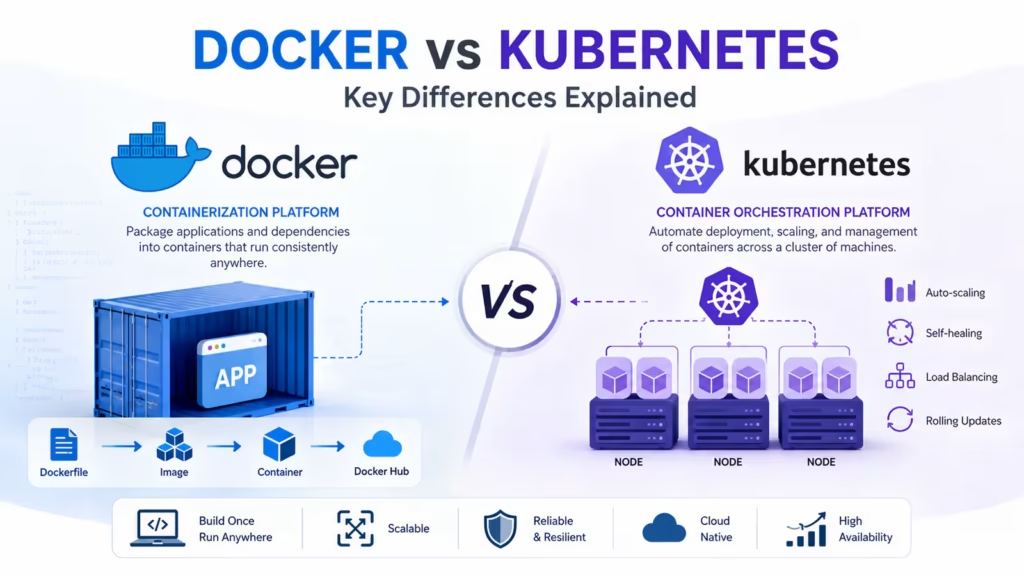
The Docker vs Kubernetes debate comes up in almost every DevOps discussion. Both are essential tools in modern software deployment, but they solve different problems. Docker is a containerization platform. Kubernetes is a container orchestration system. Understanding exactly where one ends and the other begins is the key to using them correctly together.
What Is Docker?
Docker is a platform that lets you package an application and everything it needs — code, libraries, configuration files, and runtime — into a single unit called a container. That container runs identically on any machine that has Docker installed, whether it is your laptop, a colleague’s machine, or a cloud server.
Before Docker, the classic developer problem was that an application worked on the developer’s machine but failed in production due to environment differences. Docker eliminates that problem by bundling the environment with the application itself.
The core Docker components are:
- Dockerfile — a text file with instructions for building a Docker image.
- Image — a reusable template built from a Dockerfile. Think of it as a blueprint.
- Container — a live environment created from an image. The same image can launch multiple containers.
- Docker Hub — a public registry where you can find and share Docker images.
What Is Kubernetes?
Kubernetes, commonly known as K8s, is an open-source platform first created by Google. It helps automate the deployment, scaling, and management of container-based applications. If Docker is what packages and runs your containers, Kubernetes is what manages those containers at scale across a cluster of machines.
Imagine you have a web application that needs to run twenty instances of your container to handle peak traffic. Kubernetes handles distributing those twenty containers across your server cluster, restarting any that crash, scaling down to five instances when traffic drops, and routing user requests to healthy containers automatically. You define the desired state, and Kubernetes constantly works to maintain it.
Core Kubernetes concepts:
- Pod — the smallest deployable unit. A pod runs one or more containers that share network and storage.
- Node — a physical or virtual machine in your cluster where pods run.
- Cluster — a collection of nodes managed by Kubernetes.
- Deployment — describes the desired state for a set of pods, including how many replicas to run.
- Service — provides a stable network address to access a set of pods.
The Core Difference: Containers vs Orchestration
The simplest way to understand Docker vs Kubernetes is through a real-world analogy. Docker is like a shipping container — it standardizes how cargo is packaged and transported. Kubernetes is like the port management system — it decides where each container goes, how many arrive, what happens when one is damaged, and how to reroute when something goes wrong.
Docker answers the question: how do I package and run my application consistently?
Kubernetes answers the question: how do I manage hundreds of containers running across dozens of machines reliably?
You generally need Docker to create the containers that Kubernetes manages. They work together, not against each other. Saying Docker vs Kubernetes sets up a false competition — the realistic conversation is about when you need just Docker and when you need Kubernetes on top of Docker.
Docker Compose: Managing Multiple Containers Without Kubernetes
Before reaching for Kubernetes, many teams use Docker Compose. Docker Compose lets you define and run multiple containers together using a single YAML configuration file. For example, you can define your web application, your database, and your caching layer in one docker-compose.yml file and start all three with a single command.
Docker Compose is excellent for local development environments and simple multi-container applications on a single server. However, it cannot manage containers across multiple machines, cannot automatically restart containers on different nodes if one server fails, and does not offer built-in load balancing or auto-scaling. That is where Kubernetes becomes necessary.
Side-by-Side Comparison: Docker vs Kubernetes
| Aspect | Docker | Kubernetes |
|---|---|---|
| Primary Purpose | Container creation and runtime | Container orchestration at scale |
| Scale | Single host or Docker Swarm | Multi-node clusters |
| Learning Curve | Moderate — beginner friendly | Steep — requires deeper knowledge |
| Auto-scaling | Not built-in | Built-in horizontal pod autoscaler |
| Self-healing | Basic restart policies | Automatic pod rescheduling |
| Load Balancing | Requires external tools | Built-in service load balancing |
| Best For | Dev environments, small apps | Large-scale production workloads |
When to Use Docker Alone
Docker by itself is sufficient in several situations. If you are running a personal project, a small business application, or a service with predictable, low traffic, Docker without Kubernetes is usually the right choice. Adding Kubernetes to a small application introduces operational complexity that is not justified by the scale.
Docker alone works well when:
- Your application runs on a single server.
- Your traffic is stable and does not require automatic scaling.
- Your team is small and does not have Kubernetes expertise.
- You are running a staging or development environment.
- You want fast iteration without managing a complex orchestration layer.
When Kubernetes Becomes Necessary
Kubernetes becomes the right choice when your application outgrows what a single server can handle or when your operational requirements exceed what simple Docker deployments can manage. Here are signals that indicate Kubernetes is the next step:
- You are running microservices with dozens of independent components that need to communicate reliably.
- Your application needs to scale automatically based on traffic spikes — for example, an e-commerce site during sales events.
- You need zero-downtime deployments where traffic is gradually shifted to new container versions.
- You require self-healing — if a container crashes at 3 AM, Kubernetes restarts it automatically without anyone being woken up.
- Your infrastructure spans multiple servers or cloud availability zones for redundancy.
Kubernetes is the dominant orchestration platform used by Netflix, Spotify, Airbnb, and essentially every major technology company running container workloads at scale.
Managed Kubernetes Services on Cloud Platforms
Setting up Kubernetes from scratch is complex. That is why all major cloud providers offer managed Kubernetes services that handle the control plane for you, removing much of the operational burden.
- Amazon EKS — Elastic Kubernetes Service on AWS. Deep integration with other AWS services like IAM, VPC, and ECR.
- Google GKE — Google Kubernetes Engine. Often considered the most mature managed Kubernetes offering since Google originally created Kubernetes.
- Azure AKS — Azure Kubernetes Service. Tight integration with Azure Active Directory and Azure DevOps pipelines.
With managed Kubernetes, you focus on defining your deployments and services rather than maintaining the cluster infrastructure itself. The cloud provider handles upgrades, scaling the control plane, and ensuring high availability of the Kubernetes API server.
Docker Swarm: Docker's Own Orchestration Answer
Docker does offer its own orchestration tool called Docker Swarm. Swarm turns a group of Docker hosts into a single virtual Docker host. It is simpler than Kubernetes and uses the same Docker CLI commands you already know.
Swarm is a reasonable middle ground for teams that need basic multi-host container management without the complexity of Kubernetes. However, Kubernetes has far greater adoption, a larger ecosystem, more advanced features, and significantly more community support. In the current market, investing time in Kubernetes skills delivers much better career value than Swarm expertise.
Most organizations that start with Swarm eventually migrate to Kubernetes as their systems grow. Learning Kubernetes first avoids a potentially difficult migration later.
Learning Path: From Docker to Kubernetes
If you are new to both tools, the right sequence is to learn Docker first. Understanding containers, images, volumes, and networking with Docker gives you the foundation you need before Kubernetes makes sense.
A practical learning path:
- Install Docker Desktop and run your first container locally.
- Write a Dockerfile for a simple web application and build an image.
- Use Docker Compose to run a multi-container application locally.
- Push an image to Docker Hub or a private container registry.
- Install Minikube or use a managed Kubernetes service to run your first Kubernetes cluster.
- Write your first deployment YAML file and apply it to the cluster.
- Expose your deployment using a Kubernetes service and test it.
- Practice scaling your deployment up and down manually, then configure the horizontal pod autoscaler.
Pairing this learning sequence with certification study — Docker Certified Associate followed by Certified Kubernetes Administrator — builds the credentials that DevOps employers look for.
Start Your DevOps Career Today
Join WhaleCourse Technologies for affordable training with hands-on projects and placement support.
Conclusion
Docker vs Kubernetes is not a choice between competing tools — it is a question of scale and operational need. Docker is where every containerized application begins. It solves the environment consistency problem and makes packaging software repeatable. Kubernetes is what you reach for when managing containers at scale becomes too complex to handle manually.
Learn Docker first and build confidence with containers. Then learn Kubernetes when your applications grow or when your career path demands it. The combination of both skills is one of the most in-demand profiles in the DevOps job market today. Companies across every industry are actively looking for engineers who understand both sides of this picture.
In This Article
Enroll in Our IT Courses
Master IT Program at whalecoursetechnologies
- Expert Mentorship from IT Professionals
- Job-Ready Skills with Live Projects
- Career Boost Add-on Modules
- 100% Placement & Interview Support
