
Top Selenium 4 Features Every Automation Tester Should Know
Software testing is changing fast, and keeping up with the latest tools is key to building reliable test suites. If you write automated tests for web applications, you probably use Selenium. For many years, Selenium has remained one of the most widely adopted frameworks for automating web browsers. The release of its fourth major version brings a lot of updates that make testing easier, faster, and more robust. In this guide, we will explore the main selenium 4 features that can help you write better tests and debug them with less effort. Whether you are just starting with automation testing or refining an existing Selenium framework, learning these enhancements will help you work more efficiently and avoid many common testing challenges.
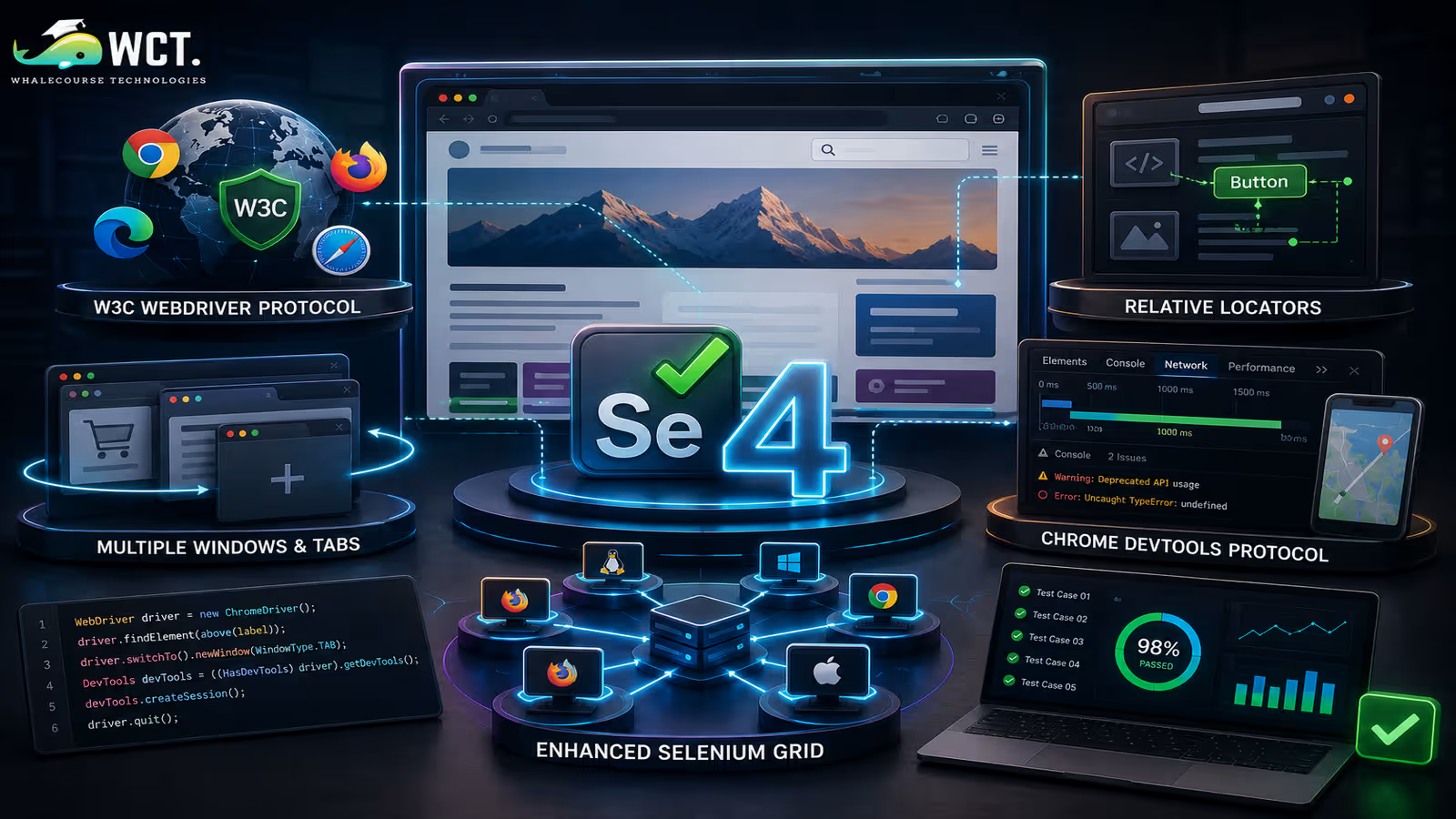
The Shift to the W3C WebDriver Protocol
One of the biggest changes in the background is the complete adoption of the W3C (World Wide Web Consortium) WebDriver protocol. In older versions of Selenium, the framework used a custom system called the JSON Wire Protocol to talk to browsers. This old protocol required encoding and decoding commands into JSON format, which sometimes caused issues when different browsers interpreted commands in slightly different ways.
By switching entirely to the W3C standard, Selenium 4 communicates directly with browsers without any translation layers. Modern web browsers like Chrome, Firefox, Safari, and Edge are already built to support W3C standards. This change means that your test scripts run much more consistently across different browsers. It reduces the chances of flaky tests, where a test passes in one browser but fails in another for no clear reason. Furthermore, direct communication speeds up test execution and makes session creation much more reliable.
Key Selenium 4 Features for Everyday Testing
While structural changes like the W3C standard are great, you will also find several new tools and APIs that directly impact how you write tests daily. These updates address long-standing challenges in web element locating, browser tab management, and deep integration with modern browser engines. We will look at the four most important enhancements introduced in this release. Understanding these selenium 4 features will make your daily automation tasks smoother.
Relative Locators
In web automation, finding elements on a page can sometimes be difficult, especially if the HTML structure lacks unique IDs or class names. Previously, testers had to write complex XPath or CSS selector expressions. Selenium 4 introduces Relative Locators, which let you find elements based on their position relative to other elements.
You can now locate an element by describing where it is on the screen using human-friendly terms. The API includes five helper methods: above(), below(), toLeftOf(), toRightOf(), and near(). For example, if you want to find a text input field next to a specific label, you can tell Selenium to look for the input box that is to the right of the label element. This makes your locator code easier to read and maintain, as it mimics how a real user visually navigates a webpage.
Multiple Windows and Tabs Management
Web applications often require users to open new tabs or windows to complete tasks, such as opening a help document or completing a payment process. Testing these workflows in older Selenium versions was clumsy. Testers had to create new driver instances or write complex window handle switching logic just to open a blank tab.
Selenium 4 simplifies this with the new newWindow() method. You can now open a new tab or a completely new window using a single line of code and automatically switch the driver’s focus to it. You simply pass the window type, either WindowType.TAB or WindowType.WINDOW, as an argument. Built-in support for tabs and windows makes these workflows much easier to manage, reducing reliance on custom utility methods that were often difficult to maintain in earlier Selenium versions.
Chrome DevTools Protocol (CDP) Integration
Modern browsers contain advanced developer tools that help developers inspect network traffic, view console logs, and debug performance. Selenium 4 provides built-in support for the Chrome DevTools Protocol (CDP). This integration allows automation testers to perform advanced actions that were previously impossible with WebDriver alone.
With CDP integration, you can capture frontend console logs to check for JavaScript errors while your tests are running. You can also simulate slow network speeds to test how your application behaves under poor connection conditions. Additionally, you can mock geolocation coordinates to verify that localized content loads correctly, and bypass basic authentication dialogs. This feature bridges the gap between traditional UI testing and modern browser debugging, giving you deeper control over the testing environment.
Enhanced Selenium Grid
Selenium Grid allows you to run tests in parallel across multiple machines, operating systems, and browsers. The grid architecture has been completely rewritten in Selenium 4. The old setup was often difficult to configure and scale, relying on a central hub and connected nodes.
The new Grid is built with a microservices-based architecture. It is broken down into several components: the Router, the Distributor, the Session Map, the Session Queue, and the Nodes. You can run these components together or deploy them as separate services on a Kubernetes cluster. The new Grid also has native support for Docker, making it easy to spin up isolated containerized browsers for your tests. In addition to these backend improvements, Selenium 4 includes a modern dashboard UI that gives you a clear visual overview of running sessions and system resources.
How to Get Started with the New Features
- Update your project dependencies: Open your build configuration file (like pom.xml for Maven or build.gradle for Gradle) and update the Selenium dependency version to 4.x.
- Review deprecated code: When you compile your project, check for compiler warnings. Selenium 4 deprecates several classes and methods, so you should replace them with their modern alternatives to ensure long-term compatibility.
- Refactor your locators: Identify complex XPath expressions in your existing test cases and try replacing them with Relative Locators to make your tests cleaner and more readable.
- Implement Chrome DevTools Protocol (CDP) commands: Start by writing a test that captures browser console logs or mocks your network speed to see how easy it is to use the new CDP APIs.
- Deploy the new Selenium Grid: If you run tests in parallel, download the new grid jar file and start it in fully distributed mode or containerized mode using Docker.
Important Deprecations in Selenium 4
- FindsBy Interfaces: The old FindsById, FindsByClassName, and similar interfaces have been removed. You should now use the standard findElement(By.id()) or findElement(By.className()) methods instead.
- DesiredCapabilities: While still available in some forms, DesiredCapabilities has been largely replaced by browser-specific options classes, such as ChromeOptions, FirefoxOptions, and EdgeOptions.
- The Actions Class: Several helper methods in the Actions class have been updated. Methods that were used to perform mouse actions now require explicit target elements to prevent unexpected hover behavior.
- Opera Driver Support: Since Opera is now based on Chromium, the standalone OperaDriver has been removed. You can test Opera using ChromeOptions with the binary path set to the Opera browser.
Action Class Enhancements and Native Events
The Actions class in Selenium is used to simulate complex user interactions like drag-and-drop, double-clicking, or hovering over menus. Selenium 4 introduces several enhancements to this class to make these interactions more reliable and closer to actual human behavior.
One major addition is the ability to scroll web pages using the mouse wheel natively. The new scrollToElement() method lets you scroll directly to a specific element before interacting with it, which helps prevent errors where elements are off-screen. There are also new methods like clickAndHold() and contextClick() that accept direct target elements as arguments, making your code cleaner. These updates ensure that complex gestures are simulated correctly across all modern web browsers.
Telemetry and Observability in Grid
When running hundreds or thousands of tests in parallel on a test grid, finding the root cause of a failure can be very difficult. Sometimes, a test fails because of a network issue or a slow node rather than a bug in the application itself. To solve this problem, Selenium 4 introduces built-in telemetry and observability.
The new grid uses OpenTelemetry to trace requests as they move through different components of the grid. This means you can track a test session from the moment it is received by the Router, through the Session Queue, and down to the specific Node where it runs. If a session fails or hangs, you can inspect the trace logs to see exactly where the bottleneck or error occurred, making debugging infrastructure issues much easier.
Why You Should Upgrade to Take Advantage of Selenium 4 Features
Upgrading your existing test suites to use the new selenium 4 features provides clear benefits for your development cycle. First, the W3C compliance means you will spend less time writing browser-specific workarounds. This directly translates to more stable test runs and higher confidence in your deployment pipeline.
Second, the ability to interact with browser internals via CDP allows you to write more thorough test cases. You can verify network payloads, check console errors, and simulate real-world mobile environments with ease. Lastly, the modern grid architecture makes it simple to scale your test execution, whether you are running tests on a local development machine or in a cloud-based CI/CD pipeline.
Start Your Data Analytics Career Today
Join WhaleCourseTechnologies for affordable training with hands-on projects and placement support.
Conclusion
Selenium 4 is a major step forward for web browser automation. By aligning with modern web standards and introducing powerful new APIs, it helps testers build robust, readable, and maintainable test suites. From Relative Locators that simplify element selection to deep Chrome DevTools integration and an overhauled Grid, the framework provides everything needed to handle modern web applications.
Making the switch might require some refactoring of older test code, but the benefits in speed, reliability, and debugging capability are worth the effort. By adopting these selenium 4 features early, you can future-proof your test suites and ensure your applications perform flawlessly across all platforms.
In This Article
- The Shift to the W3C WebDriver Protocol
- Key Selenium 4 Features for Everyday Testing
- How to Get Started with the New Features
- Important Deprecations in Selenium 4
- Action Class Enhancements and Native Events
- Telemetry and Observability in Grid
- Why You Should Upgrade to Take Advantage of Selenium 4 Features
- Conclusion
Enroll in Our IT Courses
Master IT Program at whalecoursetechnologies
- Expert Mentorship from IT Professionals
- Job-Ready Skills with Live Projects
- Career Boost Add-on Modules
- 100% Placement & Interview Support
