



























Advanced Excel
Course in
Chennai
Upgrade your career with our Advanced Excel Course in Chennai with Pay After Placement at Whalecourse Technologies. Learn formulas, functions, Pivot Tables, charts, dashboards, and data analysis through online or offline training. Build job-ready Excel skills with hands-on practice and real-world projects. Prepare for better career opportunities with expert trainers and practical learning.
3 Month
Duration
No
Coding
Any
Degree
100%
Placement
No
IT Experience
High Paid
Job
Any
Graduation Year
3 Month
Duration
No
Coding
Any
Degree
No
IT Experience
100%
Placement
Any
Graduation Year
About the Advanced Excel Course
Our Advanced Excel Course in Chennai helps students and working professionals master powerful Excel skills used in real companies. You will learn formulas, Pivot Tables, dashboards, data analysis, and automation through hands-on practice and real-time projects in Microsoft Excel. This course builds your confidence to handle business reports, analyze data, and grow your career faster with job-ready skills.
Free Addon Benefit You'll Gain
- 550+ Students Placed Every Month
- Free Aptitude and Technical Skills Training
- Hands-On Projects & Real-time Scenarios
- AI Powered Self Interview Practice Portal
- Interview Preparation For Freshers
- 100% Placement Assistance
100% Placements | Get Hired in Top MNC
Advanced Excel Course: Why Are They in High Demand?
Advanced Excel skills are in high demand as businesses depend on data analysis, financial reporting, dashboards, MIS reporting, and automation for daily operations. Professionals with strong Excel expertise are essential across finance, HR, operations, marketing, and business analytics roles.
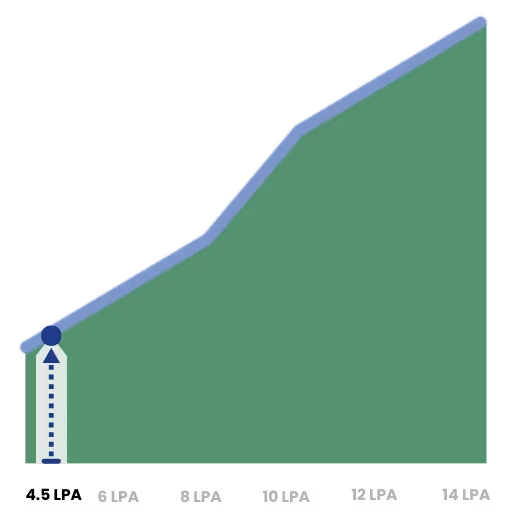
Average Advanced Excel Professional Salary (India)
Source: INDEED INDIA
Hiring data from Naukri shows growing demand for Advanced Excel skills in MIS Executive, Business Analyst, Financial Analyst, and Operations roles.
Foundit India reports rising hiring across IT, BFSI, e-commerce, manufacturing & GCCs — Advanced Excel remains a core skill.
Target Students
Who is this for ?
Whalecoursetechnologies Advanced Excel Course in Chennai is designed for students, freshers, and working professionals who want to master Excel for real-world business tasks. This course equips you with job-ready skills in data analysis, dashboards, Pivot Tables, and automation to boost your career and stand out in the workplace.
College Students
Fresh Graduates
Job Seekers
Working Professionals
Finance Executives
HR Professionals
Data Operators
Business Owners
Career Switchers
Placement Support
Job Roles in Advanced Excel
Whalecoursetechnologies Advanced Excel Placement Support helps students and working professionals get jobs in popular roles like Data Analyst, Financial Analyst, and Reporting Specialist. Through practical training and real-time projects, you’ll learn the skills companies need and boost your career in data-driven jobs.
Data Analyst
Business Analyst
Financial Analyst
Accounts Executive
HR Analyst
Operations Executive
Marketing Analyst
Data Specialist
Reporting Analyst
Our Students in Leading Companies
Essential Advanced Excel Tools
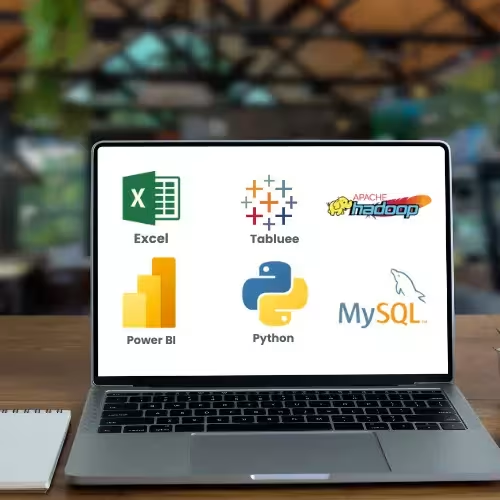
Master the essential Excel tools used by top professionals to analyze, visualize, and manage data efficiently. Gain hands-on experience with Pivot Tables, VLOOKUP, XLOOKUP, INDEX & MATCH, Macros, Conditional Formatting, Dashboards, and Power Query to boost your career in data analysis and reporting.
Structured Course
Advanced Excel Course Content
Our Advanced Excel Course is designed to give students and professionals complete mastery of Excel tools and techniques. You’ll learn data handling, analysis, visualization, dashboards, and automation through practical exercises, preparing you to handle real-world business datasets and reports confidently.
1. Introduction & – Basics
- Overview of Advanced Excel
- Understanding Excel interface and workbooks
- Data types, cell references, and formatting
- Keyboard shortcuts for efficiency
2. Formulas & Functions
- Mathematical & statistical functions: SUM, AVERAGE, MIN, MAX, MEDIAN
- Logical functions: IF, AND, OR, NOT
- Lookup functions: VLOOKUP, HLOOKUP, XLOOKUP
- INDEX & MATCH combination
- Text functions: LEFT, RIGHT, MID, CONCAT, TRIM, LEN
- Date & time functions: TODAY, YEAR, DATE, EOMONTH, NETWORKDAYS
3. Conditional Formatting & Data Validation
- Highlight duplicates, top/bottom values, and trends
- Custom formulas in conditional formatting
- Create dropdown lists and restrict invalid entries
- Apply input messages and error alerts
4. Pivot Tables & Pivot Charts Services
- Create and modify Pivot Tables
- Grouping data by date, category, or value
- Summarizing large datasets efficiently
- Insert Pivot Charts and slicers for interactive reporting
5. Charts & Visualization
- Column, Bar, Line, Pie, Area, and Combo charts
- Sparklines and conditional charts
- Dynamic chart ranges and formatting
- Interactive dashboards with charts
6. Data Analysis Tools
- What-If Analysis: Goal Seek, Scenario Manager, Data Tables
- Forecasting and trendlines
- Descriptive statistics using Excel Analysis ToolPak
- Solver for optimization problems
7. Power Query & Data Cleaning
- Connect to multiple data sources: Excel files, CSV, databases
- Transform data: rename, change types, remove duplicates
- Merge, append, pivot/unpivot data
- Handle errors and missing values
8. Macros & VBA Automation
- Record and edit macros
- Introduction to VBA editor
- Automate repetitive tasks
- Create custom functions and simple scripts
9. Advanced Dashboards
- Combine Pivot Tables, charts, and slicers
- KPI tracking and interactive reporting
- Conditional formatting in dashboards
- Best practices for presenting data clearly
10. Real-World Projects
- Financial reporting and analysis
- Sales dashboards and performance reports
- HR and employee data management
- Custom automated Excel solutions
Launch Your Career with Our 100% Placement Support
Interviews
Launch Your Career with Our 100% Placement Support
Interviews
Expert Trainers with Industry Experience
Learn from expert trainers with real-world Excel and data experience, who teach practical skills in formulas, Pivot Tables, dashboards, and automation. Their guidance helps you gain hands-on expertise and confidence to excel in data analysis and advance your career.
This Advanced Excel course is ideal for beginners! You don’t need any prior knowledge—just curiosity and a willingness to learn. Through hands-on lessons, you’ll become skilled in formulas, Pivot Tables, dashboards, and data analysis, gaining the confidence to work with real business data.
Job-Ready Advanced Excel Program
Our Job-Ready Advanced Excel Program equips you with the skills that top employers look for. Learn to analyze data, create dashboards, automate tasks, and interpret business reports with confidence to excel in data-driven roles. Start your journey to become a confident Excel professional and boost your career opportunities in Chennai.
Highly Practical
What You'll Learn ?
- Learn to organize, clean, and manage datasets efficiently using Excel.
- Build charts, Pivot Tables, dashboards, and interactive reports in Advanced Excel Course.
- Use formulas and functions to analyze data and extract meaningful insights.
- Automate repetitive tasks with Macros and VBA for faster workflow.
- Apply conditional formatting and data validation to improve data accuracy.
- Transform raw data into actionable business insights using Advanced Excel Course techniques.
- Work on real-world projects with datasets similar to industry scenarios.
- Present findings clearly with professional dashboards and reports.
Student Success Stories
I learned so much from the Advanced Excel Course at Whalecoursetechnologies in Chennai. Now I can handle large datasets and create dashboards confidently, which has made my work faster and more accurate.
Priya K
Student
Before joining this Advanced Excel course, I only knew basic formulas. Now I can create dashboards, analyze large datasets, and automate reports with confidence. This training truly improved my job performance.
Raju V
Data Analyst
At Whalecourse, the step-by-step teaching method made complex Excel functions easy to understand. Working on real-time projects helped me handle office reports independently and significantly increased my productivity.
Nivetha S
HR Executive
Master In-Demand Job Guarantee IT Courses
Gain hands-on skills in the latest IT tools and techniques to become job-ready and advance your career.
Data Analytics
AWS
Testing
Digital Marketing
Full Stack Dev
Why Whale is the Smarter Choice
Languages
Support 1:1
Support Until Placement
Mock Interview
Real Time Projects
Lifetime Access Recordings
Lifetime Access Materials
Interview Questions
Working Professionals as Trainers
Whales
English, Hindi, Telugu & தமிழ்
Mail, Chat & Call – 24/7
Others
English, Hindi, Telugu & தமிழ்
Mail, Chat & Call – 24/7
Why Whale is the Smarter Choice
English, Hindi, Telugu & தமிழ்
Mail, Chat & Call – 24/7
Whale Courses Certification: Key Benefits
Earn a certification that is recognized worldwide, enhancing your credibility and career opportunities.
Showcase your skills and distinguish yourself from the competition in the data analytics industry.
Gain an edge over peers by showcasing your Whalecourse certification and industry-relevant skills.
High-Quality Education With Affordable Price
₹15,000
+ GST
Per month • For 2 months
₹25,000 30,000
NO GST
One-time full payment
- 20 Sessions & 4 Tools
- 60-Hour Live Classes
- English, Tamil
- Lifetime Access to Recordings
- 5 Final Projects
- Placement Support
Frequently Asked Questions
Does Whalecourse Technologies provide placement support?
Yes. At Whalecourse Technologies, learners in our Advanced Excel Course receive placement support that includes resume guidance, mock interviews, interview preparation, and job referral assistance. Our goal is to help you build confidence and prepare for careers in reporting, operations, data management, and related business roles.
What career opportunities are available after the Advanced Excel Course?
After completing our Advanced Excel course, you can apply for roles like MIS ExecutivAfter completing our Advanced Excel Course, you can apply for roles such as MIS Executive, MIS Analyst, Reporting Executive, Operations Executive, Accounts Executive, Data Coordinator, and Entry-Level Data Analyst across various industries.e, Accounts Executive, Data Analyst (Entry-Level), Operations Executive, and Reporting Executive.
Are freshers eligible for placement support?
Absolutely. Our Advanced Excel Classes are beginner-friendly and designed to help freshers build practical spreadsheet skills, business reporting knowledge, and confidence for job opportunities.
Can hands-on training improve my job opportunities?
Yes. At Whalecourse Technologies, we focus on real-world tasks such as dashboard creation, MIS reporting, KPI tracking, data analysis, and business reporting. This practical experience helps you perform confidently during interviews.
What is the cost of the Advanced Excel Course in Chennai?
Our Advanced Excel Course is priced to be affordable for students, freshers, and working professionals. The program includes hands-on training, practical assignments, real-world exercises, mentor guidance, and career support to help you develop industry-ready Excel skills.
Are flexible payment options available for the course?
Yes. Our Advanced Excel Institute provides convenient EMI and installment options to help students and working professionals enroll in the training program with ease and manage their learning expenses comfortably.
Is certification included in the course fee?
Yes. After successfully completing our Advanced Excel Classes, you’ll receive a course completion certificate. We provide this certification to help strengthen your resume and demonstrate your commitment to professional development.
Are there any additional fees apart from the course cost?
No. Our Advanced Excel Institute maintains a clear and transparent fee structure. The course fee covers training, learning materials, practical assignments, certification, and mentor support, with no unexpected or extra charges.
Who will teach the Advanced Excel Course?
You’ll learn from experienced industry professionals who specialize in business reporting, Excel automation, dashboard creation, Power Query, Power Pivot, and advanced data analysis techniques used in modern workplaces.
Will I receive practical, hands-on training during the course?
Yes. Our Advanced Excel Classes focus on practical, hands-on learning. Mentors help you build dashboards, generate reports using Power Query, apply data validation techniques, use conditional formatting effectively, and create business reporting solutions based on real-world scenarios.
Will I receive direct support from mentors during the course?
Absolutely. Our Advanced Excel Institute provides live doubt-clearing sessions, one-to-one mentor support, and additional guidance whenever you need help understanding a topic.
Will mentors provide interview and career support?
Yes. Whalecourse Technologies mentors help you prepare for interviews through common Excel questions, resume reviews, reporting scenarios, and career guidance tailored to Excel-based job roles.
What topics are covered in the Advanced Excel Course?
Our Advanced Excel Course covers Pivot Tables, Pivot Charts, VLOOKUP, XLOOKUP, INDEX & MATCH, Data Validation, Conditional Formatting, Excel Tables, Power Query, Power Pivot, dashboard creation, data cleaning, data visualization, MIS reporting, KPI dashboards, and Excel automation techniques commonly used in modern business environments.
Who can join Advanced Excel Classes?
Students, freshers, working professionals, accountants, entrepreneurs, and business owners can enroll in our Advanced Excel Classes. The course follows a step-by-step learning approach that helps learners understand advanced Excel techniques clearly, regardless of their previous experience.
Will the course include practical training sessions?
Yes. You’ll work on practical assignments involving MIS reports, KPI dashboards, financial reports, data cleaning, sorting, filtering, chart creation, and business reporting tasks. This hands-on approach helps you develop confidence and accuracy.
How can this course support my career growth?
After completing our Advanced Excel Course, you can explore opportunities in reporting, operations, finance, administration, and data analysis. Our Advanced Excel Institute in Chennai helps you develop practical skills that enhance employability, improve workplace efficiency, and support long-term career growth across multiple industries.